As a customized OPS PC supplier, I get this question all the time from clients: “How do I make sure the device I ordered actually performs the way I need it to?” It’s a valid concern—off-the-shelf PCs never quite fit the unique workflows that drive your operations, so a customized OPS PC has to deliver exactly what you specified, whether that’s 24/7 uptime for a retail point-of-sale system, seamless display integration for a corporate conference room, or low latency for a industrial control setup. I’ve seen too many projects get derailed because testing was an afterthought, not a deliberate, end-to-end process. Over the last 8 years building custom OPS PCs, I’ve refined a testing framework that works for every industry, and I’m breaking it down step-by-step here. Customized OPS PC
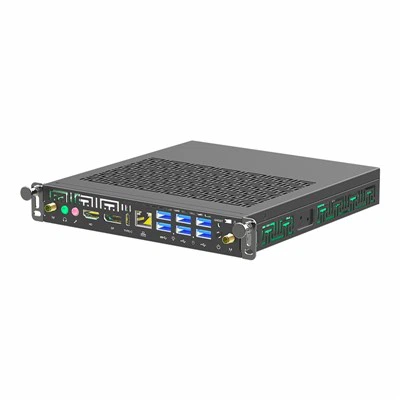
First, let’s ground this in what makes an OPS PC different from a regular desktop. OPS (Open Pluggable Specification) devices are designed to slide into digital signage, interactive whiteboards, industrial displays, and POS terminals, so their performance has to work in tandem with the host hardware—not just as a standalone computer. That means testing can’t stop at a basic speed check; it has to validate both internal component performance and compatibility with the specific display or system you’re pairing it with.
The first phase of testing starts before we even ship the unit, because waiting until a custom device is boxed up to test wastes time and materials. We call this Component Validation Testing. A customized OPS PC is only as good as its parts, and I’ve seen too many cut corners here. For example, a client once ordered a 10th-gen Intel Core i7 for their OPS PC, but the supplier used a cheaper after-market cooling module that couldn’t handle the processor’s sustained load. After 2 weeks of 12-hour shifts, the unit throttled, leading to missed sales for a retail chain. To avoid that, we test every individual component first: CPU, RAM, SSD, power supply, and the OPS form factor itself.
For CPUs, we use a two-part test: short-term stress testing and long-term stability testing. Short-term runs Prime95’s Small FFTs test, which pushes every core to 100% for 15 minutes. This checks two things: first, that the CPU can reach its advertised base and boost clocks without thermal throttling, and second, that the cooling system (a critical part of a customized OPS PC, since they’re often sealed in display enclosures) doesn’t overheat. We monitor temperatures with a thermal camera during this test—any core over 90 degrees Celsius during the run is a hard fail, because that’s the threshold where performance starts to degrade and wear accelerates. Then, for long-term stability, we run Prime95’s Blend test for 8 hours straight. This mimics the mixed workload of a typical OPS PC, where it might be running a POS application, a display controller, and a background analytics tool all at once. We track clock speed consistency over those 8 hours; any drop below 90% of the advertised boost clock means we adjust the cooling or swap the CPU.
RAM testing is just as important, especially for OPS PCs used in multitasking-heavy environments like digital signage networks that run multiple video feeds. We use MemTest86, which runs 10 full passes to check for faulty modules, incorrect timings, and compatibility with the OPS board’s RAM slots. I once had a client who ordered 16GB of DDR4-3200, but the OPS board only supported DDR4-2933; MemTest86 caught the mismatch before we built the unit, saving us a return and the client a delay in their project. For industrial OPS PCs, where vibration can loosen components, we also do a RAM stress test with a memory-intensive workload for 24 hours to make sure the modules don’t drop out.
SSD testing is where data integrity matters most, because a failed SSD means lost data for POS transactions or critical industrial logs. We use CrystalDiskMark to test sequential read/write speeds first—we target at least 90% of the SSD’s advertised speed, because some cheap OEM SSDs underperform by 15-20% when run in OPS form factors. Then we run a 72-hour write endurance test: we write 10GB of data to the drive every hour, totaling 720GB, and monitor for bad sectors or data corruption. For clients running 24/7 operations, we use industrial-grade SSDs rated for high endurance, but we still test them to confirm they can handle the load.
Component validation also includes a physical check of the OPS form factor itself. The OPS connector has 30 pins that transmit power, video, and data to the host display, so even a tiny bent pin can cause no signal, lag, or random reboots. We inspect the connector with a magnifying glass, then test power delivery: we feed the OPS PC its rated voltage and make sure it doesn’t drop below 19V (the standard for OPS devices) under full load, because low voltage will cause unstable performance. That’s a mistake I made early on—we had a unit that worked on our test bench but wouldn’t power up in a client’s display because the power pin was misaligned. Now we do a full connector functional test before we even assemble the PC.
Once all components pass, the next phase is Custom Workload Testing, because a customized OPS PC’s performance is only relevant to your specific use case. Off-the-shelf benchmark tests like Geekbench don’t tell you how the device will run your POS software, your display’s 4K video feed, or your industrial control application. This is where we work closely with clients to replicate their exact workflow in our lab before shipment.
Let’s take a retail POS OPS PC as an example. A client might need the device to run a point-of-sale system, process credit card transactions, and display a promotional video loop on the customer-facing screen all at the same time. To test this, we install their exact POS software, connect a real card reader, a receipt printer, and a 55-inch 4K display, then simulate 500 transactions over 24 hours. We track two metrics: transaction speed (how long it takes to process a sale, from swiping the card to printing a receipt) and uptime. If the transaction time exceeds 2 seconds (the standard for smooth POS operations), we adjust the CPU or SSD allocation. We also check for drops in video quality during peak transaction times—sometimes a 4K video feed will stutter if the CPU is tied up processing transactions, so we have to balance resources between tasks.
For digital signage OPS PCs, which are often used in retail stores, airports, or corporate lobbies, the main performance metric is display and content playback. We test playback of the exact video files the client uses, at their native resolution (4K, 8K, or even HDR), and simulate weeks of continuous playback. We use tools like MediaInfo to check for frame drops: any frame drop rate over 0.5% is a fail, because that’s noticeable to viewers. We also test compatibility with the host display’s video protocols—HDMI 2.1, DisplayPort, or embedded DisplayPort (eDP) —because some OPS PCs struggle with HDR content on certain displays. For example, a client once ordered a 8K OPS PC to run on a 65-inch Samsung QLED, but the OPS board’s video controller didn’t support HDR10+; we swapped the controller before shipment, so the unit worked perfectly when it was installed.
Industrial OPS PCs have even stricter workload requirements: they often run control systems that require low latency, meaning any delay can cause equipment downtime or safety issues. For a factory OPS PC that controls a conveyor belt, we test the responsiveness of the control software: we send a command to start or stop the conveyor, and measure the time it takes from the command being sent to the physical action occurring. We target latency under 100 milliseconds, which is the threshold for most industrial control applications. We also test the unit’s performance in high-vibration environments by running it on a vibration table for 4 hours, mimicking the movement of a factory floor, and check for drops in performance or disconnections.
The third phase is Compatibility Testing with the host hardware, which is unique to OPS PCs. Even if the customized PC passes all internal tests, it won’t work right if it doesn’t communicate properly with the display, host power supply, or peripheral devices. This is a common pain point for clients who buy off-the-shelf OPS PCs; they work in the lab but fail when installed. To avoid that, we test with the exact make and model of the host display the client uses, not a generic one. For example, if a client is installing the OPS PC in a Sharp interactive whiteboard, we connect it directly to that Sharp unit, test video output, touchscreen functionality (if the whiteboard is touch-enabled), and power sharing. Some displays draw power from the OPS PC, so we test that the OPS PC’s power supply can handle both the PC’s load and the display’s power needs. We also test peripheral compatibility: printers, card readers, barcode scanners, and control modules. For a POS client, we connect 3 different barcode scanners and test that they all work without lag, even when the OPS PC is under full load.
The final phase is Real-World Field Testing, which is the most critical step because lab tests can’t replicate every edge case a client will encounter in their actual environment. We always recommend a 2-week on-site pilot test before full production. We send a unit to the client’s location, install it in their actual display, run their workflow for 2 weeks, and track performance in real time. For example, a client in a grocery store had a pilot unit that worked perfectly in our lab, but when installed in their store, the Wi-Fi kept disconnecting during peak hours. The lab had tested Wi-Fi in a controlled environment, but the store had thick metal shelves that caused signal interference. We adjusted the Wi-Fi antenna placement and added a signal booster, which fixed the issue. Another client in a cold storage warehouse had a customized OPS PC that failed in our lab’s 25-degree Celsius test, but the warehouse was 0 degrees Celsius; we swapped for an industrial cooling module rated for low temperatures, and it worked.
After all these tests, if the unit passes, we provide a full performance report to the client, including all test metrics, temperatures, latency, and compatibility checks. This way, you have concrete proof that your customized OPS PC will perform as expected in your environment.
Now, I know testing a customized OPS PC can seem time-consuming, but it’s nothing compared to the cost of a failed unit after installation. As a supplier, my goal isn’t just to sell you a PC—it’s to make sure it solves your specific problem, whether that’s reducing transaction time at your retail stores, delivering smooth 4K content in your lobbies, or controlling your factory equipment. If you have a customized OPS PC project in mind, whether it’s for POS, digital signage, industrial use, or any other application, let’s connect to discuss your requirements, and I can walk you through how we tailor our testing process to your needs.
OPS PC References
- Open Pluggable Specification (OPS) 1.0 Specification. UPOA (Universal Pluggable Open Architecture), 2013.
- “Industrial PC Component Testing Standards”. Industrial Technology Association, 2021.
- “POS System Performance Benchmarking”. National Retail Federation, 2022.
- “Digital Signage Content Playback Metrics”. Digital Screen Network Association, 2020.
Shenzhen HJS Technology Group
Shenzhen HJS Technology Group is one of the most experienced customized ops pc manufacturers and suppliers in China, featured by quality products and good service. Please rest assured to buy CE approved customized ops pc made in China here from our factory. For price consultation, contact us.
Address: F10, Wanhe Technology Building C, No. 7 HuiTong Road, Fenghuang Street, Guangming New District, Shenzhen. China.
E-mail: info@hjs-pc.com
WebSite: https://www.hjs-pc.com/
